

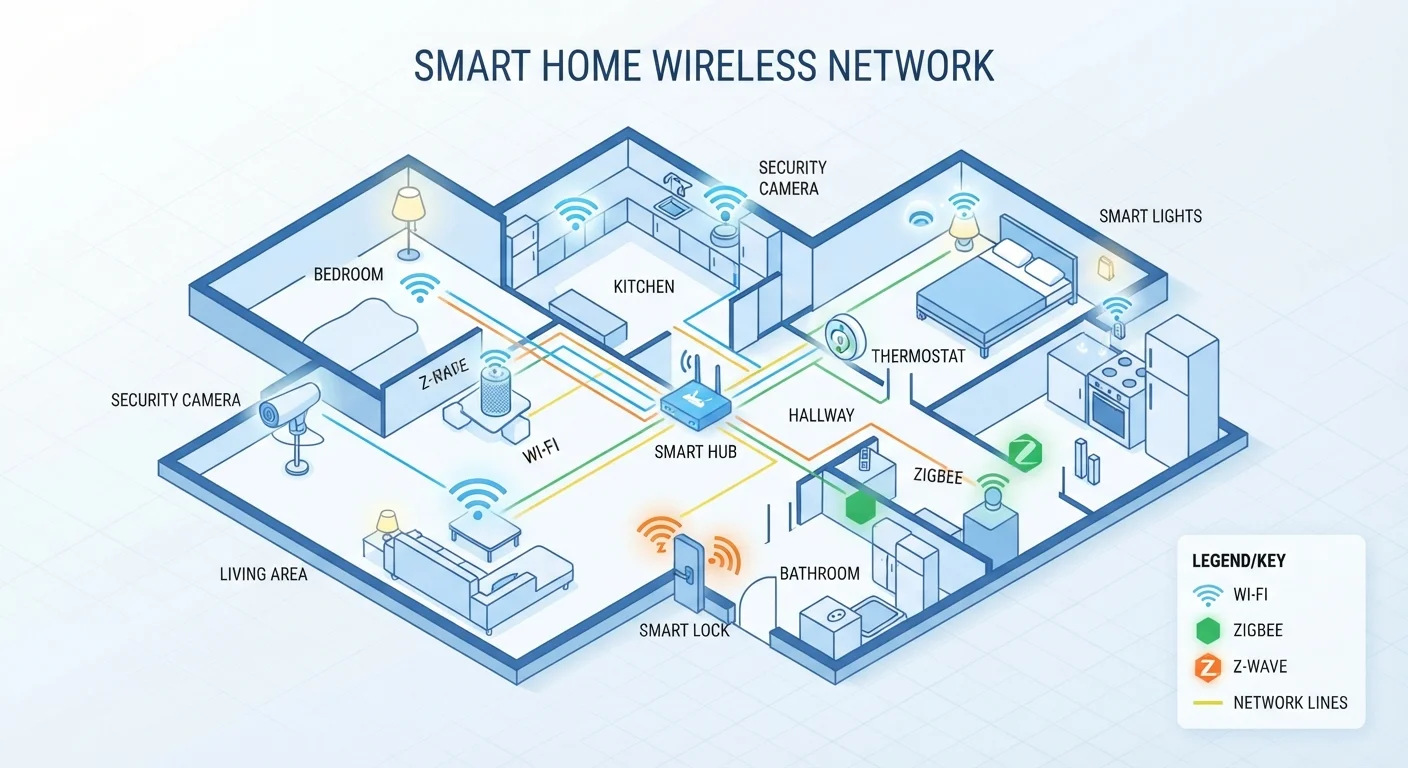
Why Protocols Matter Before You Buy
When you're building a connected home, the devices you choose aren't just hardware — they're members of a communication network. If two devices speak different wireless protocols and no translator is available, they simply won't work together, regardless of how capable either one is individually.
If you're new to all of this, our plain-language explanation of what 'smart home' actually means is a useful starting point. For a deeper foundation across all smart home concepts, the Connected Home from the Ground Up guide covers everything before your first purchase.
The four protocols most consumers encounter are Wi-Fi, Zigbee, Z-Wave, and Matter. Each has real trade-offs in range, battery impact, network load, and compatibility.
4
Major smart home protocols consumers encounter
Wi-Fi, Zigbee, Z-Wave, and Matter cover the vast majority of consumer smart home products available today.
908 MHz
Z-Wave operating frequency in the U.S.
This sub-gigahertz frequency is less congested than the 2.4 GHz band, reducing interference from Wi-Fi and Bluetooth devices.
Mesh
Network topology used by Zigbee and Z-Wave
In a mesh network, each device relays signals to its neighbors, extending range and redundancy without requiring every device to reach the hub directly.
Wi-Fi: Familiar but Network-Heavy
Wi-Fi smart devices — think video doorbells, smart plugs, and many thermostats — connect directly to your home router using the same 2.4 GHz or 5 GHz bands as your laptop and phone. The upside is simplicity: no extra hub required, and setup typically involves just an app and your Wi-Fi password.
The downside is scale. Every Wi-Fi device occupies a connection slot on your router, and older or budget routers can struggle when dozens of devices compete for bandwidth. Wi-Fi devices also tend to consume more power than low-power alternatives, which matters for battery-operated sensors. If your home network already feels sluggish, a capable router becomes more important than ever when adding smart devices.
Ease Network Strain from Wi-Fi Devices
If you plan to add more than 15–20 Wi-Fi smart devices, consider a router that supports a dedicated IoT network band or VLAN (virtual local area network). Segregating smart devices onto their own network segment reduces interference with your primary devices and makes troubleshooting easier if one device misbehaves.
Zigbee and Z-Wave: Low-Power Mesh Networks
Both Zigbee and Z-Wave use a mesh network topology — meaning each device acts as a signal repeater, passing commands along to nearby devices rather than routing everything through a central point. This makes them highly reliable across larger homes and very efficient on battery-powered devices like door sensors and smart locks.
Zigbee operates on the 2.4 GHz band (shared with Wi-Fi and Bluetooth, which can cause interference) and is an open standard, meaning many manufacturers build compatible hardware. Z-Wave uses a less-congested sub-gigahertz frequency (around 908 MHz in the U.S.) and is tightly controlled by a standards body, which historically meant stricter compatibility requirements between certified devices.
Both typically require a hub — a central controller that bridges these protocols to your router and smartphone. Some smart speakers and multi-protocol hubs now integrate Zigbee or Z-Wave radios directly.
Hub Compatibility Varies Widely
Not all hubs support both Zigbee and Z-Wave — some handle only one. Before purchasing a hub, confirm which protocols it supports and whether firmware updates have a track record of adding new device compatibility. Reading user community forums for a given hub can surface real-world reliability patterns that spec sheets don't capture.
Matter: The Emerging Universal Standard
Matter is a newer application-layer protocol developed collaboratively by major technology companies with the goal of solving smart home fragmentation. A Matter-certified device is designed to work with any Matter-compatible platform — whether that's a particular voice assistant ecosystem, a hub, or a smartphone app — without brand-specific workarounds.
Matter runs over Wi-Fi and Thread (a low-power mesh protocol), giving it flexibility for both plug-in and battery-operated devices. It also emphasizes local processing — commands can execute without an internet connection, which improves speed and reliability during outages.
Matter doesn't automatically replace your existing Zigbee or Z-Wave devices. For a detailed comparison of how Matter stacks up against the protocols it was designed to coexist with, see our article on Matter vs. older smart home standards.
“The promise of Matter is that the question 'will this work with my system?' should eventually have a default answer of yes — but we're still in the early stages of that becoming a reality across the full range of device categories.”
— Connectivity Standards Alliance, Industry body that maintains the Matter specification
Choosing the Right Protocol for Your Home
There's no single correct answer — the right protocol depends on what you're automating, how many devices you plan to add, and whether you're willing to manage a hub.
- Small setups with a few plug-in devices: Wi-Fi is often the path of least resistance.
- Battery-powered sensors, locks, or large device counts: Zigbee or Z-Wave provide better reliability and battery life.
- Starting fresh or prioritizing future flexibility: Choosing Matter-certified devices where available reduces the risk of ecosystem lock-in.
Mixing protocols is common and usually manageable with a multi-protocol hub, but it adds complexity. Understanding these trade-offs before you purchase — rather than after — is what separates a smooth smart home build from a frustrating one. Our smart home glossary can help clarify any additional terms you encounter along the way.
Frequently Asked Questions
In most cases, yes. Zigbee and Z-Wave devices typically communicate with a central hub or controller that bridges them to your Wi-Fi network and smartphone app. Some smart speakers and routers now include built-in Zigbee or Z-Wave radios, which can serve as that hub.
Matter doesn't eliminate older protocols — it creates a new compatibility layer on top of Wi-Fi and Thread. Many existing Zigbee and Z-Wave devices won't automatically become Matter-compatible, though some hubs offer software updates that add Matter support for devices already on your network.
Dropped connections usually stem from protocol mismatches, interference, or devices placed too far apart. See our <a href="/home-tech/smart-home-basics/why-your-smart-devices-stop-talking-to-each-other">guide to why smart devices stop communicating</a> for a breakdown of common causes and fixes.
Wi-Fi is widely supported and doesn't require a separate hub, but reliability depends heavily on your router and network congestion. Adding dozens of Wi-Fi devices can slow your network. Zigbee and Z-Wave mesh networks are often more reliable for large device counts.
Thread is a low-power mesh networking protocol — similar in concept to Zigbee — that Matter uses as one of its underlying transports. Matter provides the application layer (the shared language for commands), while Thread handles the radio communication between devices.
The content on this site is for informational purposes only and is not a substitute for professional advice. Always consult a qualified professional for guidance specific to your situation.