

Why Small Spaces Demand Smarter Decisions
Not everyone has a spare bedroom to convert into an office. Many remote workers carve out a corner of a studio apartment, a section of the living room, or a nook in the bedroom — and they still need the setup to perform. The challenge isn't lack of space; it's making deliberate choices so that every item earns its place.
If you're starting from scratch, the foundational decisions around desk, chair, and tech are the same regardless of square footage. What changes in a small space is how aggressively you must prioritize. Before rearranging anything, it also helps to run through a home office planning checklist covering outlets, lighting, and connectivity — issues that become harder to fix after furniture is in place.
Below are seven practical solutions — covering furniture, tech, and organization — that keep a compact workspace genuinely functional.
Choose a Wall-Mounted or Fold-Down Desk
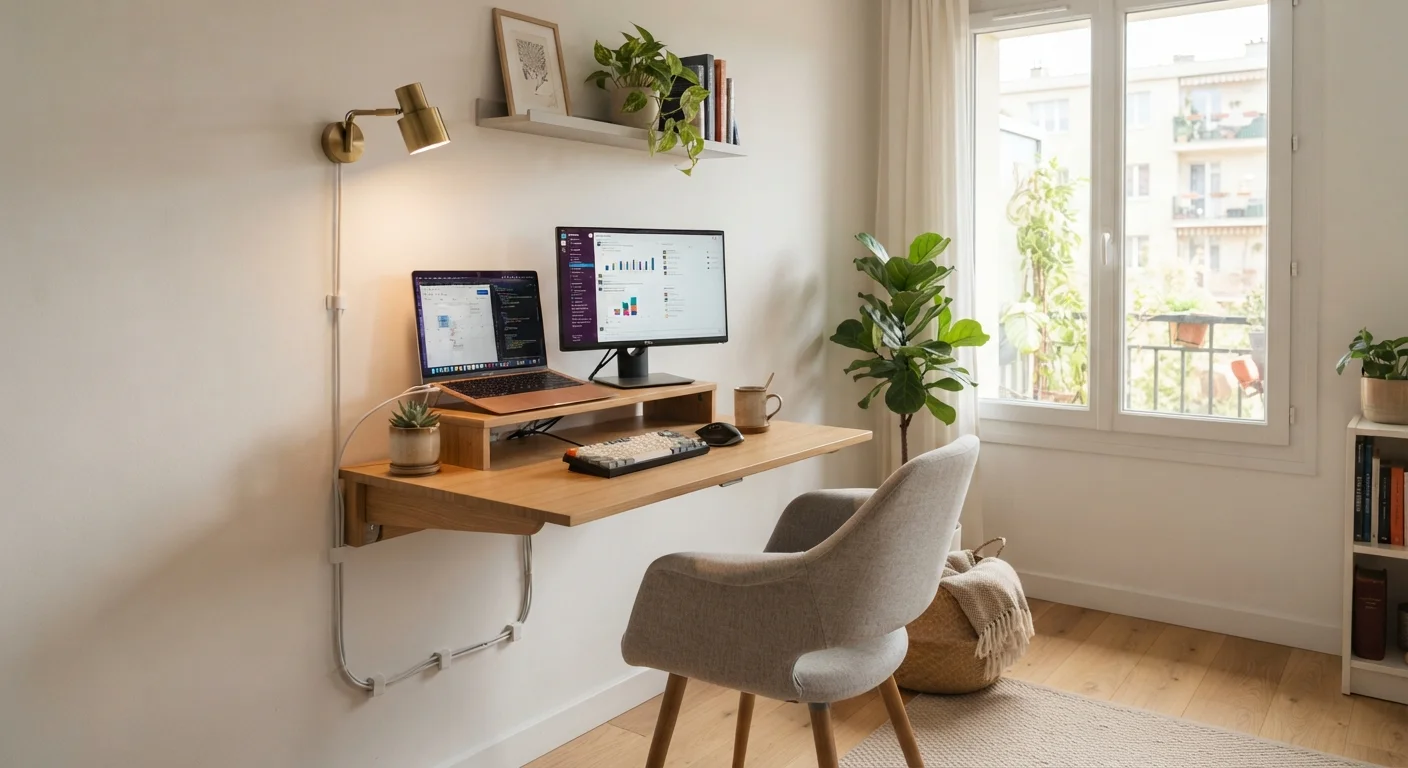
A desk that folds flat against the wall when not in use is one of the highest-impact decisions in a small space. When open, it provides a genuine work surface; when closed, it disappears entirely — freeing the floor for other uses. Wall-mounted shelves paired with a pull-down surface can accommodate a laptop, a small external monitor, and essential peripherals without claiming permanent square footage.
Look for designs with integrated shelving above the fold-down panel, which keeps everyday items — notebooks, a small speaker, charging cables — within reach without spreading onto the work surface itself.
A fold-down desk reclaims your floor the moment the workday ends.
Use a Monitor Arm to Free Up Desk Surface
A monitor stand occupies a fixed footprint and can't be repositioned quickly. A monitor arm — a articulating mount that clamps to the desk edge — holds the screen at the correct height and distance while leaving the desk surface clear beneath it. In small spaces, that recovered surface area matters for spreading out notes, using a keyboard comfortably, or simply reducing visual clutter.
Monitor arms are available for single and ultrawide displays. If you're weighing whether a second screen is worth the space it takes, the real tradeoffs of dual-monitor setups are worth understanding before committing.
Mounting your monitor on an arm effectively adds usable desk space for free.
Go Vertical With Storage
Floor space is finite; wall space is often underused. Floating shelves positioned above or beside a desk provide storage for books, supplies, and equipment without expanding the desk's footprint. Pegboards are another versatile option — they can hold cable organizers, small trays, headphone hooks, and lightweight accessories in a customizable arrangement that's easy to reconfigure as needs change.
The goal is to keep the desk surface reserved for active work, not storage. Items that aren't used daily should live on a shelf or in a drawer, not spread across the primary work area.
Walls are free real estate — shelves and pegboards keep desks clear for actual work.
Manage Cables Aggressively
Cable clutter looks worse — and causes more friction — in a compact space than it would in a larger room. A few practical measures make a significant difference: adhesive cable clips along desk edges route cords out of the work zone; a small power strip mounted under the desk consolidates plugs in one hidden location; and labeling cables prevents the frustration of tracing a tangle when something needs to be unplugged.
For a thorough approach, step-by-step cable organization strategies cover routing, labeling, and management methods that keep any desk functional and tidy.
In a small space, unmanaged cables escalate from an annoyance to a genuine obstacle.
Prioritize Lighting as Infrastructure, Not Afterthought
Poor lighting creates eye strain, makes video calls look unprofessional, and can make a small space feel even more constricted. A small LED desk lamp with adjustable color temperature addresses task lighting without occupying much surface area. A ring light or a small panel light positioned slightly off to the side improves video call appearance markedly — more than a camera upgrade will in most cases.
If possible, position the desk to face or sit beside a natural light source rather than with a window directly behind — backlighting makes faces dark on video and increases screen glare during focused work.
Lighting is infrastructure — poor light undermines focus and video presence simultaneously.
Consider a Compact Docking Station Over Multiple Loose Devices
In a small workspace, a laptop paired with a compact docking station often outperforms a sprawling arrangement of individual peripherals. A single dock connects monitor, keyboard, mouse, audio, and charging through one cable to the laptop — reducing both clutter and setup time when transitioning between work and personal use. Many docks are small enough to mount under the desk or sit behind the monitor arm, keeping the surface clear.
This approach also means the workspace can be dismantled quickly if the area needs to serve another purpose — an important consideration when the office and the living room share the same physical space.
One dock, one cable — a compact docking station simplifies a small setup considerably.
Use Acoustic Panels or Strategic Soft Furnishings to Manage Sound
Sound is often overlooked in small-space planning, but it has direct consequences for focus and call quality. Hard surfaces — bare walls, wood floors, glass — reflect sound and increase echo. In a small space, adding soft elements helps absorb it: a rug under the desk area, a fabric chair, even a bookshelf filled with books on one wall all contribute to a calmer acoustic environment.
For more targeted control, small acoustic foam panels can be mounted near the desk without extensive installation. Separately, a USB microphone with cardioid pickup — meaning it captures sound primarily from directly in front — reduces the amount of room noise that reaches call participants compared with built-in laptop microphones.
Soft furnishings are acoustic tools — they reduce echo without requiring renovation.
Pulling It Together in Practice
The most effective small-space offices tend to share a common trait: every element was chosen intentionally rather than accumulated gradually. A monitor arm that replaces a bulky stand, a wall shelf that handles storage without occupying floor space, or a single capable laptop instead of a sprawling multi-device setup — these aren't compromises; they're purposeful constraints that often produce a cleaner, less distracting environment.
Test Your Setup Before Committing
Before wall-mounting anything or purchasing furniture sized to a specific nook, spend a day working from the intended spot using temporary arrangements. Note where cables bunch, where light hits the screen, and whether the chair position feels sustainable over several hours. Small adjustments identified early are far cheaper than reversing permanent installations.
Keep in mind that connectivity and ergonomics deserve as much attention as physical space. A cramped desk with a reliable network and a properly positioned screen will outperform a spacious desk with poor internet and neck strain. For more on desk height, monitor distance, and ergonomics, or on building a home network that supports stable video calls, both topics repay attention even in the smallest setups.
Finally, long hours at a compact desk make movement breaks more important, not less. Simple movement habits that fit into a sedentary work day can offset the physical costs of limited space without requiring equipment or a gym.
The content on this site is for informational purposes only and is not a substitute for professional advice. Always consult a qualified professional for guidance specific to your situation.